Breakdown9 min read
Data life cycle basics
Computer Science · Data · Foundations · Systems · Curriculum · Information
A curriculum-shaped breakdown of the data life cycle: plan and create, collect, process, store, share and use, archive, and dispose—plus cross-cutting quality, security, privacy, and provenance so data work stays honest from birth to deletion.
Data is not a static pile of files. In any serious system it is born, shaped, stored, moved, interpreted, retained, and eventually destroyed—or it lingers forever and becomes a liability. The data life cycle is the standard way computer science and information systems curricula name that path.
This note is a breakdown of the life cycle as a knowledge area: definitions, stages, cross-cutting concerns, and how the idea connects to databases, operating systems, security, and analytics.
One-sentence crystal
The data life cycle is the ordered story of information from intent and creation, through collection, processing, storage, use, and sharing, to long-term retention or disposal—with quality, security, privacy, and provenance binding every stage.
1. Why this is a CS knowledge area
Computer science is not only algorithms and machines. A large fraction of real systems is moving bits that mean something under constraints of correctness, cost, latency, law, and trust.
| Curriculum neighborhood | How the life cycle appears |
|---|---|
| Information systems / databases | Schema, ETL/ELT, transactions, warehouses |
| Operating systems / architecture | Files, blocks, memory, persistence, I/O |
| Networks & distributed systems | Ingest pipelines, replication, consistency |
| Security & privacy | Confidentiality, integrity, retention, erasure |
| HCI / product | What is collected from users and why |
| ML / data science | Datasets, labels, drift, training vs serving |
| Software engineering | Requirements for logs, backups, audits |
If you can only “query a table” but cannot say where data came from, who may see it, how long it lives, and how it dies, the knowledge area is incomplete.
Learning outcomes
You should be able to:
- Name the main stages of a data life cycle and what happens in each.
- Separate data, metadata, and derived data.
- Point to cross-cutting concerns (quality, security, privacy, provenance) at any stage.
- Map a familiar system (app, lab logger, firmware telemetry) onto the cycle.
- Ask stage-appropriate questions in design or review.
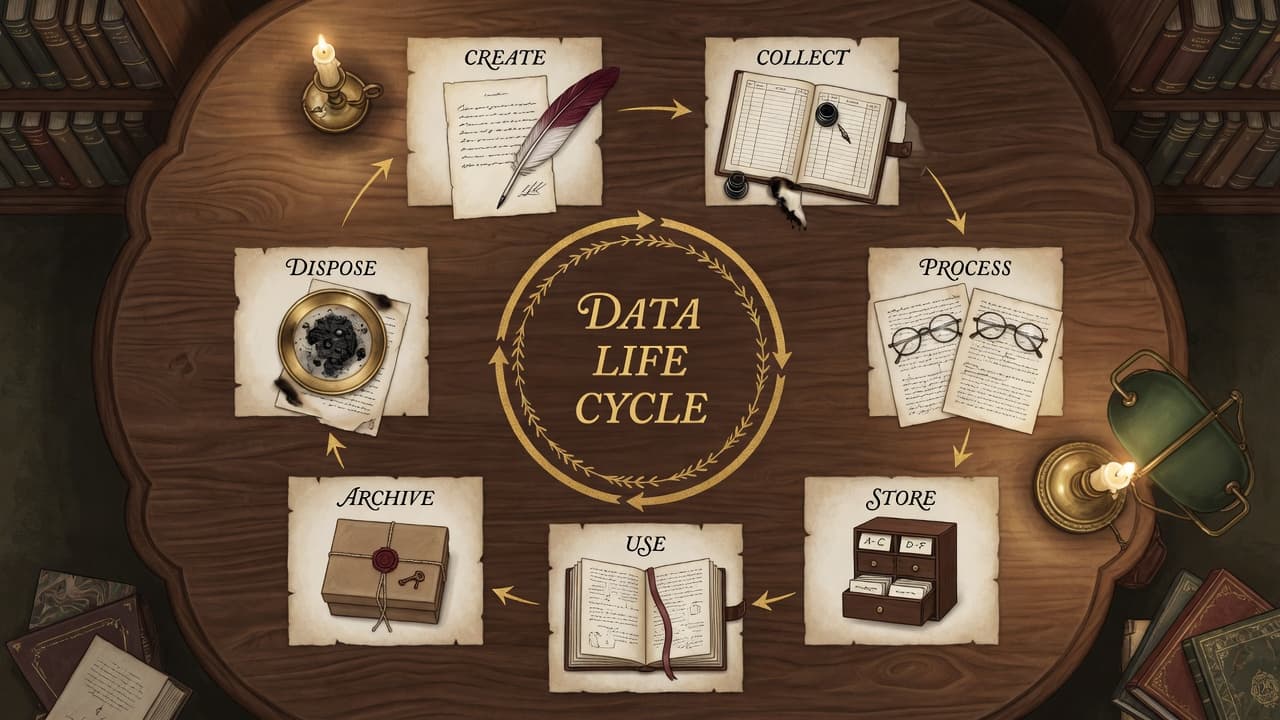
2. Bird’s-eye cycle
Stages are often drawn as a ring because disposal can free capacity for new collection, and because “use” often feeds new creation (feedback). Linearity is still useful for teaching.
                    ┌──────────────┐
           ┌───────►│ 1. Plan /    │
           │        │    create    │
           │        └──────┬───────┘
           │               ▼
           │        ┌──────────────┐
           │        │ 2. Collect / │
           │        │    ingest    │
           │        └──────┬───────┘
           │               ▼
           │        ┌──────────────┐
           │        │ 3. Process / │
           │        │  transform   │
           │        └──────┬───────┘
           │               ▼
           │        ┌──────────────┐
           │        │ 4. Store /   │
           │        │   persist    │
           │        └──────┬───────┘
           │               ▼
           │        ┌──────────────┐
           │        │ 5. Share /   │
           │        │  use / analyze│
           │        └──────┬───────┘
           │               ▼
           │        ┌──────────────┐
           │        │ 6. Archive / │
           │        │   retain     │
           │        └──────┬───────┘
           │               ▼
           │        ┌──────────────┐
           └────────│ 7. Dispose / │
                    │   destroy    │
                    └──────────────┘

   Cross-cutting (every stage): quality · security · privacy · provenance · metadata
Some curricula insert “publish / distribute” as its own stage, or fold archive into storage. The seven stages below keep decisions visible.
3. Stage-by-stage breakdown
3.1 Plan and create
Before the first row exists, someone decides what the world is allowed to mean as data.
| Concern | Questions |
|---|---|
| Purpose | Why collect this at all? |
| Model | Entities, fields, units, time base, identifiers |
| Rights | Consent, license, ownership, contractual limits |
| Sensitivity | PII, secrets, safety-related measurements |
| Success criteria | What “good data” would look like |
Create includes synthetic generation, form design, sensor selection, and log schema design. Bad planning cannot be fixed by a prettier dashboard later.
3.2 Collect and ingest
Data enters the system: sensors, user input, APIs, files, scrapers, message queues, lab instruments.
| Aspect | Literacy point |
|---|---|
| Source trust | Authenticated device vs anonymous form vs third party |
| Cadence | Batch nightly vs streaming vs on-demand |
| Validation at the door | Reject garbage early (types, ranges, schema) |
| Buffering | Queues absorb bursts; they also hide failure if unmonitored |
Ingest is the first place loss, duplication, and clock skew show up. Time stamps and source IDs belong here, not as afterthoughts.
3.3 Process and transform
Raw inputs become usable representations: clean, join, normalize, encode, aggregate, feature-engineer, encrypt, anonymize.
raw event → validate → enrich → transform → curated record
| Transform type | Example |
|---|---|
| Structural | CSV → relational tables; endian fix; unit conversion |
| Semantic | Map codes to enumerations; resolve entity IDs |
| Quality | Deduplicate, impute with policy, flag missingness |
| Privacy | Hash IDs, drop fields, k-anonymize (when appropriate) |
| Analytic | Features for models; rollups for reports |
Rule of honesty: every transform can destroy information or inject bias. Document it; version it; test it.
3.4 Store and persist
Persistence is where data lives so later stages can find it: filesystems, object stores, databases, data lakes/warehouses, embedded flash logs, cold tape.
| Dimension | Why it matters |
|---|---|
| Durability | Survive crash and media failure (replication, RAID, backups) |
| Consistency | What readers see under concurrent writers |
| Access path | Keys, indexes, partitions for the queries you actually run |
| Cost & energy | Hot SSD vs cold archive tiers |
| Format | Open vs proprietary; schema evolution |
Storage is not neutral. Choosing a log file vs a transactional DB is a life-cycle decision, not only a performance tweak.
3.5 Share, use, and analyze
The point of most data: decisions, products, models, human reading.
| Mode | Examples |
|---|---|
| Interactive | BI tools, SQL, notebooks |
| Application | Online serving, personalization |
| Machine learning | Training, evaluation, monitoring |
| Operational | Alerts, control loops, dashboards |
| Collaboration | Exports, APIs, published datasets |
Share implies authorization, contracts, and often rate limits. “Everyone can SELECT *” is not a share strategy; it is an incident waiting for a calendar date.
3.6 Archive and retain
Not all data stays hot. Archive moves infrequently used data to cheaper, slower media with explicit retention policy.
| Concept | Meaning |
|---|---|
| Retention period | How long must/may we keep it? |
| Legal hold | Do not delete despite normal policy |
| Discoverability | Can auditors find it years later? |
| Integrity | Checksums, WORM media, chain of custody |
Archive is still in the life cycle: forgotten archives are silent risk (breach surface, wrong historical truth).
3.7 Dispose and destroy
End of life: delete, shred, crypto-erase, or physically destroy media—according to sensitivity.
| Failure mode | Symptom |
|---|---|
| Soft delete only | “Deleted” rows still in backups forever |
| Orphan replicas | Cloud snapshot or laptop copy survives |
| Incomplete crypto-erase | Key destroyed but copies of ciphertext remain with old keys |
| No proof | Cannot show disposal happened when asked |
Disposal is a first-class stage. Curriculum that stops at “store and analyze” trains incomplete engineers.
4. Cross-cutting concerns (bind every stage)
These are not “extra chapters after the cycle.” They are properties of the cycle.
4.1 Data quality
| Dimension (classic set) | Rough meaning |
|---|---|
| Accuracy | Matches reality well enough for use |
| Completeness | Required fields present |
| Consistency | Same fact agrees across stores |
| Timeliness | Fresh enough for the decision |
| Validity | Conforms to format/domain rules |
| Uniqueness | No harmful duplicates |
Quality is use-relative: lab telemetry “good enough for debug” may be unfit for safety claims.
4.2 Security
Confidentiality, integrity, availability—and accountability—applied to data at rest, in transit, and in use (access control, encryption, logging, backup security).
4.3 Privacy
Not identical to security. Privacy asks whether collection and use respect people and law (minimization, purpose limitation, consent, subject rights). A well-encrypted hoard of unnecessary personal data can still be a privacy failure.
4.4 Provenance and lineage
Where did this value come from? Source system, transform version, time, operator. Lineage enables debug, audit, and scientific reproducibility. Without it, every dashboard is a rumor.
4.5 Metadata
Data about data: schemas, owners, sensitivity labels, retention tags, dictionary definitions. Metadata is what makes stages operable by people who did not create the data.
data value + metadata + provenance ≈ something you can trust or reject consciously
5. Data vs information vs knowledge (vocabulary)
Curriculum often layers meanings:
| Term | Working sense |
|---|---|
| Data | Symbols/records as stored or transmitted (bits with structure) |
| Information | Data in context that reduces uncertainty for a purpose |
| Knowledge | Justified patterns/models humans or systems use to act |
| Wisdom / judgment | Applying knowledge under values and risk (beyond this note) |
The life cycle primarily moves data and metadata; information appears when use attaches purpose; knowledge often lives in models, docs, and trained people—and can feed new data (labels, features, decisions logged as events).
6. One example mapped end-to-end
Scenario: temperature samples from a device for a dashboard and monthly report.
| Stage | What happens |
|---|---|
| Plan | 1 Hz? °C? retention 90 days? who owns it? |
| Collect | Sensor → MCU → UART/MQTT → broker |
| Process | Unit convert, spike filter, attach device_id + time |
| Store | Time-series DB + nightly backup |
| Use | Real-time chart; anomaly alert; CSV export for analyst |
| Archive | After 90 days, roll to cold object storage for 1 year |
| Dispose | Lifecycle rule deletes cold objects; verify backup expiry |
Cross-cutting: range checks (quality), TLS and auth (security), no personal location unless needed (privacy), schema version in payload (provenance).
7. Design and review checklist
- Purpose — Why does this data exist?
- Birth — Who/what creates it; under what consent or right?
- Shape — Schema, units, time, identifiers, versions.
- Path — How does it move (protocols, batches, owners)?
- Truth — How is quality measured and repaired?
- Access — Who may read/write/share; how is that enforced?
- Copies — Backups, replicas, exports—where are they?
- Clock — Retention and legal hold.
- Death — How is destruction defined and proven?
- Feedback — Does use create new data that re-enters the cycle?
Closing
The data life cycle is a curriculum backbone for treating information as something that is planned, born, refined, kept, used, and ended—not as a spreadsheet that “just is.”
Master the stages, the cross-cutting duties (quality, security, privacy, provenance, metadata), and the habit of mapping any real system onto the cycle. Algorithms and databases then have a place to live; without the cycle, they are tools without a biography of the data they touch.
Was this page helpful?